Hi Anaya, a senior Go role on a payments team. Hybrid, with the salary band in the brief.
Anaya
Interesting. How many days in the office?
Zia
Three days in Bangalore. Want a voice interview this week?
Zia
Booked: interview Thursday 16:30
Naira report cardVoice · Naira
Maya Thompson·Applied for Collections Specialist·Interviewed Sep 27, 2026, 38 min
74.0/ 100 overall
AlignedIntegrity 96%English (CEFR) B2
Strongly not alignedAlignedStrongly aligned
“Clear, calm caller who secured a payment plan without pressure tactics; audit caught 4 of 5 compliance slips. Speaks fluently at a natural call pace.”
Handle a Customer Who Disputes a Past-Due Balance
M2Voice only
Module Score4.1 / 5
Strengths
Verified identity before discussing the balance
Offered a concrete 3-month plan unprompted
Weaknesses
Slight hesitation stating the exact due date
Did not repeat the total balance for confirmation
Evidence (transcript quotes)
“I understand this is frustrating — let's find a plan that works for you and confirm it today.”
Naira report cardVoice · Naira
Maya Thompson·Applied for Collections Specialist·Interviewed Sep 27, 2026, 38 min
74.0/ 100 overall
AlignedIntegrity 96%English (CEFR) B2
Strongly not alignedAlignedStrongly aligned
“Clear, calm caller who secured a payment plan without pressure tactics; audit caught 4 of 5 compliance slips. Speaks fluently at a natural call pace.”
Handle a Customer Who Disputes a Past-Due Balance
M2Voice only
Module Score4.1 / 5
Strengths
Verified identity before discussing the balance
Offered a concrete 3-month plan unprompted
Weaknesses
Slight hesitation stating the exact due date
Did not repeat the total balance for confirmation
Evidence (transcript quotes)
“I understand this is frustrating — let's find a plan that works for you and confirm it today.”
A shortlist that leaves the platform as an attachment loses its reasoning exactly where the decision gets made. This one travels as a link, with no seat to set up.
A hiring manager on EmployLabs opens the shortlist through a link: no EmployLabs seat, no licence to buy and nothing to install. They sign in with their Google account, and only people the recruiter names can open it. The link shows that one role as the recruiter sees it, reasoning included, and opens nothing else.
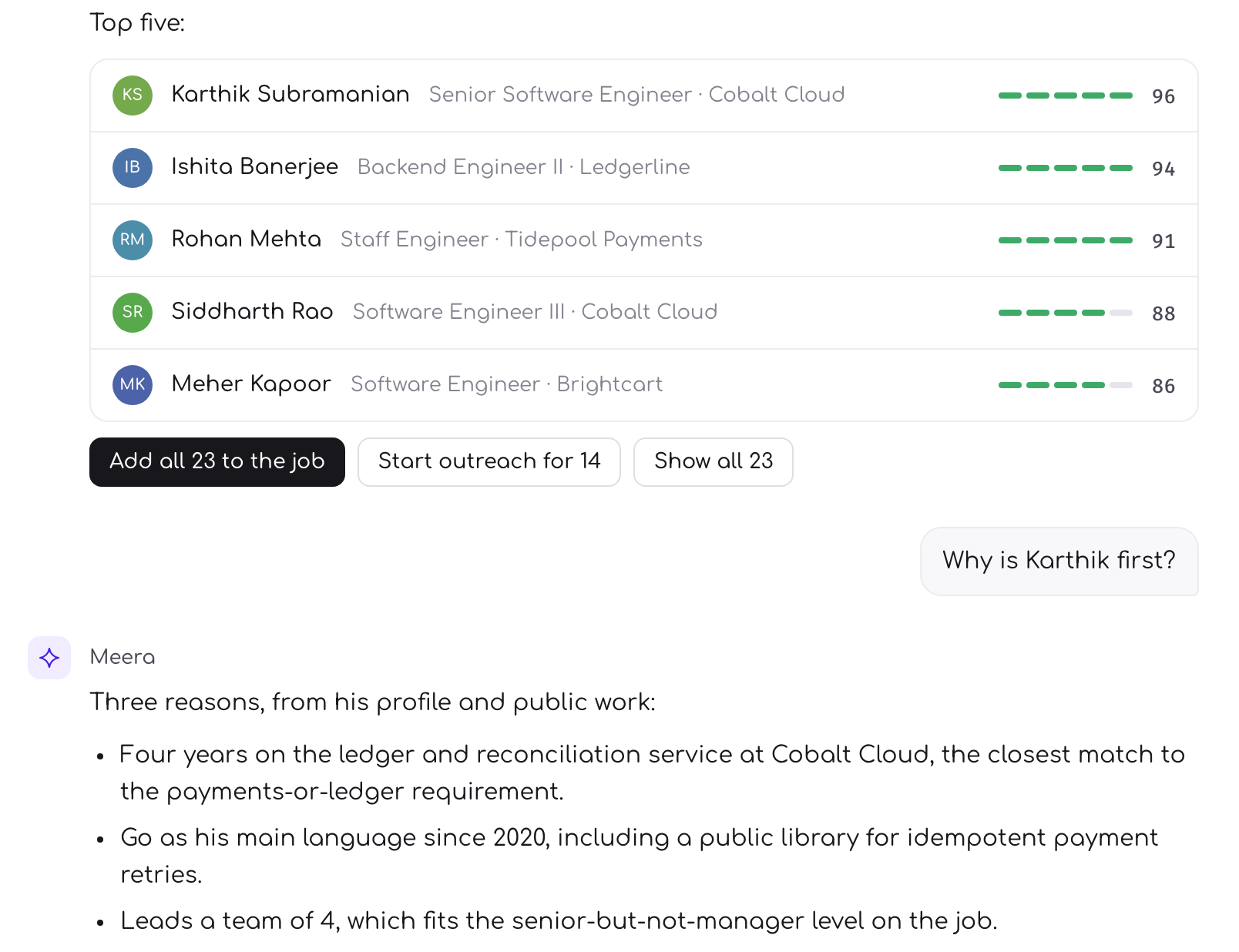
Then it has to reach the person who will decide, and almost everywhere that means it gets flattened. Five names and a paragraph each, in an email. A spreadsheet with a column of numbers. A slide, if the role is senior enough. Every one of those is a summary of the shortlist rather than a copy of it.
The decision is then made on the summary. Which is to say the decision is made at exactly the point where the reasoning stopped travelling, by the person with the least of it.
You feel this a day later, when the reply comes back saying they are not sure about the third one. Nothing in what you sent can answer that, so you go back into the platform, find the evidence, and paste it into a reply. The work was done. It simply did not survive the trip.
A link, and nothing to buy
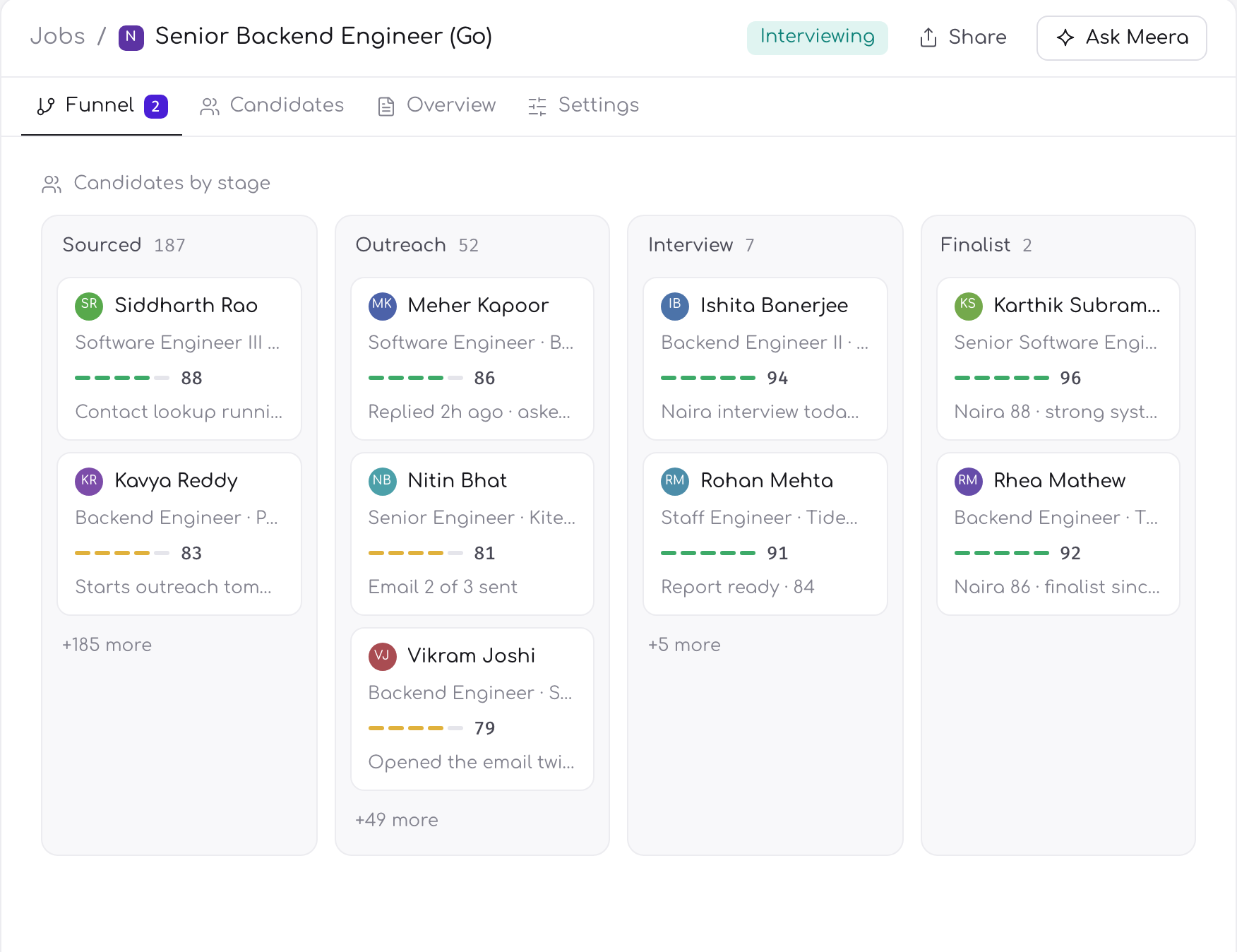
A hiring manager on EmployLabs gets a link. It shows that role as you see it: the candidates, their scores, the interviews and the outreach history. There is no EmployLabs seat to provision, no licence to buy and nothing to install. They sign in with their Google account, and only the people you name can open the link.
That is a deliberate decision rather than a small convenience. Each of those steps is a place where the person you need to look at your shortlist decides to look at the attachment instead. A hiring manager with four interviews and a product review today will not wait for a seat to be provisioned to read five candidates, and it is unreasonable to expect them to. Any barrier at that moment is paid for in the quality of the decision, not in their time.
It also removes the conversation nobody wants to have, which is asking someone to approve a purchase before they can read the work you have already done for them.
The reasoning has to survive the trip to the person who makes the decision.
Scoped to the role, not to the system
Access is scoped to the role. The link opens that one role and what sits behind it. It is not a way into the rest of the account: other searches, other candidates, or the settings that govern any of it.
This matters in both directions, and the second one is the one people forget. Guest access to a recruiting system tends to be all or nothing, so sharing one shortlist means handing over the whole picture, and a recruiter who is not comfortable doing that goes back to exporting a summary. The narrow scope is what makes sending the real thing the easy option.
From the other side, a hiring manager does not want a recruiting platform. They want the people for their role, and a reason to believe each one belongs there.
What this changes for your week
You stop maintaining a second copy of the shortlist. No export, no formatting, no version of it in a document that goes stale the moment a candidate replies.
A disagreement is settled on the evidence. When a hiring manager pushes back on somebody, you are both reading the same page rather than arguing across two different summaries of it.
Bringing another person in is not a purchasing decision. Whoever needs to see the shortlist can see it, which is how it should have been all along.
How to use it
Send the link rather than exporting anything. If you find yourself pasting evidence into an email, that is the summary problem returning by the back door.
Say what you want an opinion on. A shortlist sent with no question attached usually comes back as a preference rather than a decision.
Keep the discussion on the link. When they doubt a candidate, answer from the reasoning they can already see, not from your own recollection of it.
If their objection turns out to be about the brief rather than the person, change the brief. That is a different and much more useful conversation than defending one candidate.
Common questions
Does a hiring manager need an EmployLabs account to see the shortlist?
No seat or licence is needed. They open a link and sign in with their Google account, and only people you name can open it. There is nothing to provision or install, because any of those steps is where a busy hiring manager decides to read the emailed summary instead.
What does the hiring manager actually see on that link?
That one role as you see it: the candidates, scores, interviews and outreach history, rather than a list of names with scores attached. That means the decision is made with the evidence in front of the person making it, instead of with whatever survived being pasted into an email or a spreadsheet.
Can a hiring manager see our other searches through that link?
No. Access is scoped to the role the link is for. It shows that shortlist and what sits behind it, and it is not a route into other roles, other candidates or settings.